iFIX or InTouch WPF Runtime Application Crashing / Not Running
Issue
iFIX or InTouch WPF Runtime Application Crashing / Not Running
Solution
Open notepad as administrator (or any text editor, such as notepad++) and navigate to:
C:\Program Files (x86)\WIN-911 Software\WIN-911\iFIX
(if using iFIX and seeing the issue), or
C:\Program Files (x86)\WIN-911 Software\WIN-911\InTouch
(if using iFIX and seeing the issue)
Open/edit the respective ...WPFHost.runtimeconfig (JSON file)
WIN911_Source_iFIX_Runtime_WPFHost.runtimeconfig
or
WIN911.Source.InTouch.Runtime.WPFHost.runtimeconfig
Check the drive letter in the highlighted line of text, and change it to C:\ drive:
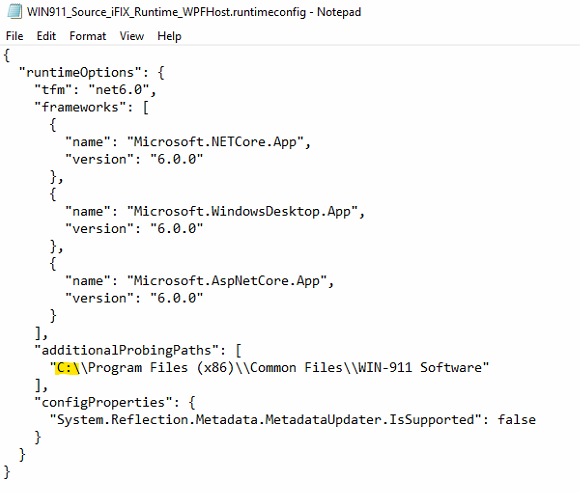

Save and close the file, restart the respective iFIX or InTouch WPF runtime application. This should now run normally and no longer crash.