Mobile Web API Authentication
The WIN-911 Mobile Web API facilitates the connection between the WIN-911 Mobile Module and WIN-911 Mobile apps, this is important because mobile devices DO NOT require direct access to your network. Both the WIN-911 Mobile Runtime and WIN-911 Mobile apps communicate with the Web API, no traffic from mobile devices passes through the Mobile Web API to your network.
WIN-911 Software hosts the Mobile Web API using Azure Cloud Services with Azure Active Directory serving as the identity provider. An identity provider is responsible for verifying the identity of users prior to accessing the Mobile Web API. The two components which access the Web API must be authenticated are the WIN-911 Mobile Module and the WIN-911 Mobile apps.
Mobile Gateway Account
When you purchase or demo WIN-911 Mobile, you will be provided with an Azure AD account belonging to our win911mobile.com tenant. This is the WIN-911 Mobile Gateway account which is used by the WIN-911 Mobile Module to access the WIN-911 Mobile Web API. When you receive the credentials for this account, you will need to change its temporary password before using it with WIN-911. You can do this by signing-in to http://login.microsoftonline.com.
Once the WIN-911 Mobile Module is connected to the Mobile Web API, you can begin adding Mobile app users to the WIN-911 configuration.
Mobile App Accounts
Mobile app accounts differ from Mobile Module accounts in that they're owned by the users of the app. Rather than receiving a win911mobile.com Azure AD account, users must create their own Microsoft account. In some cases, the user may already have a Microsoft account, for example, if they're using their work email which is tied to an Office 365 account.
We leverage Azure B2C (business-to-consumer) to extend access to the Mobile Web API to users invited to consume resources on our Azure tenant. You can learn more about Azure B2C through Microsoft's official documents.
When creating mobile app users in WIN-911 Workspace, an email address must be entered for each user. Azure AD will send an invitation to the specified email address to create a Microsoft account. If the email entered already belongs to a Microsoft account, e.g. an Office 365 account, then they'll receive a prompt to authorize access to the WIN-911 Mobile Web API.
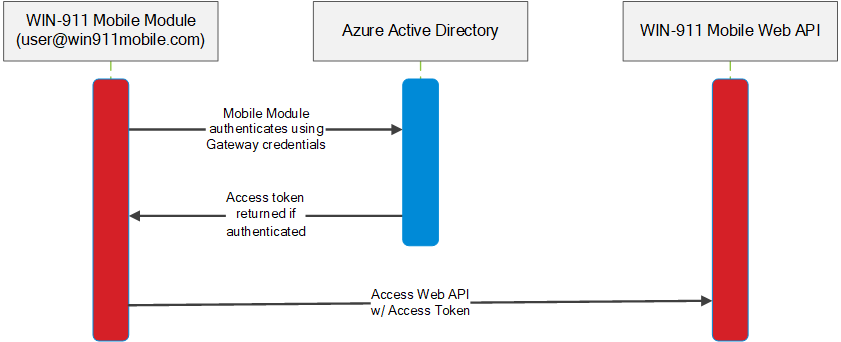
Before the WIN-911 Mobile Module or Mobile apps can access the Mobile Web API, they must first authenticate with Azure AD. Once authenticated, a token is returned which the Module and apps use to execute methods on the Mobile Web API. The WIN-911 Mobile apps follow the same process which is illustrated below.
 |