Sound Alerts
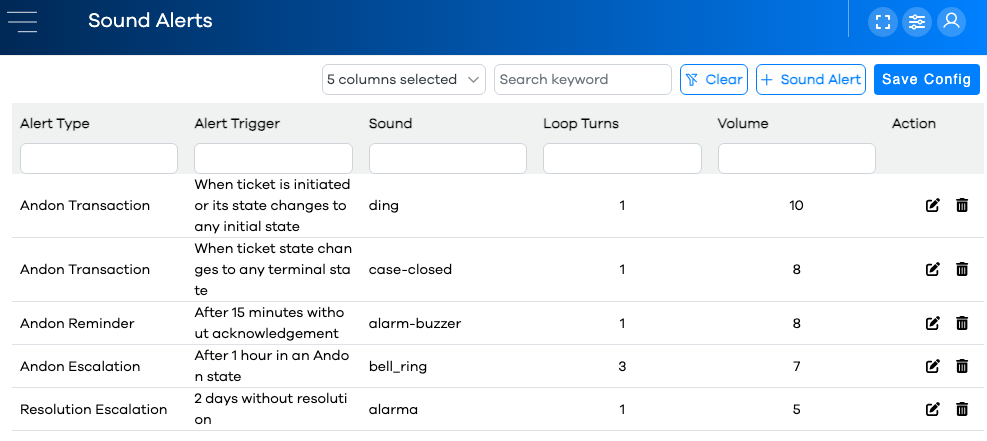
Sound alerts are triggered in much the same was as Smart Notifications. Instead of sending an email alert, however, a sound is triggered on the audio card of the client pc. As long as a user is logged into the runtime app, whenever a sound alert requirement is met, the sound will be triggered on their pc.
Note
A user can opt in or out of specific sound alerts by editing their personal preferences.
Sound Alerts are configured using the Sound Alert Editor.
Alert Types
There are four types of alerts for Smart Notifications and Sound Alerts:
Alert Type | Description |
|---|---|
Andon Escalation | When a ticket changes status, a timer is started. If the timer exceeds a certain duration before changing status again, this alert is sent to the specified Notification Group(s). |
Andon Reminder | After a ticket is opened in the "Request Made" status, a timer is started. If the timer exceeds a certain duration before being acknowledged, a reminder is sent to the appropriate Notification Group(s). |
Andon Transaction | PEER™ provides three different "states" for Ticket Status. System and Custom states are assigned to one of these three states. When a ticket changes to a status belonging to one of these three states, the specified Notification Group(s) will be alerted. More info on Ticket Status State Types below. |
Resolution Escalation | When a ticket is opened in the "Request Made" status, a timer is started. If the timer exceeds a certain duration before entering a Terminal status, an escalation notification is sent to the appropriate Notification Group(s). |