Editing Smart Notifications
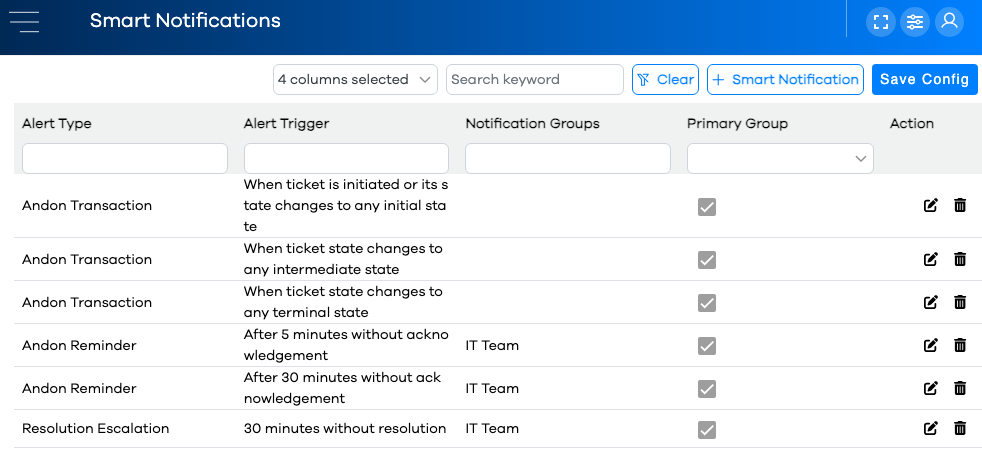
Smart Notifications are edited by clicking the button in the left-hand navigation menu.
The list of current smart notifications will be displayed in a Configuration Grid.
Smart Notification Parameters
Smart Notification Parameters are specified in the Smart Notification Editor, and are as follows:
Parameter | Description | Required? |
|---|---|---|
Alert Type | The type of rule used to test whether a Smart Notification should be triggered. The options for this parameter are summarized in the Smart Notifications topic. | Yes |
Alert Trigger | The condition which triggers the Smart Notification, based on the alert type. These are also summarized in the Smart Notifications topic. | Yes |
Primary Group | When checked, this Smart Notification will automatically be sent to the Notification Groups specified in the Create Ticket form. | Yes |
Notification Groups | Notification Groups specified here will receive the Smart Notification, when its conditions are met. | No |
Adding a New Smart Notification
Warning
If your grid is filtered or sorted, be mindful that the new row might not be visible on the current page of rows, or based on the current column filters and/or keyword search.
Click the button in the upper-right of the grid.
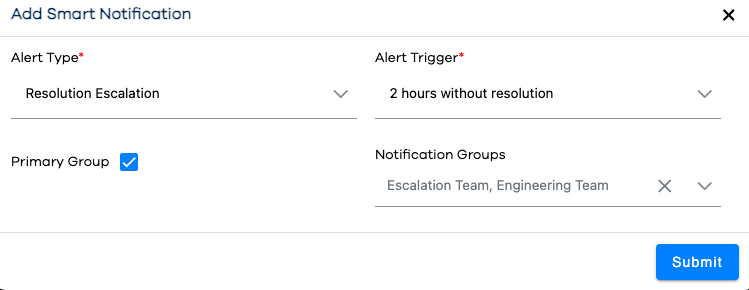
Choose an Alert Type from the dropdown.
Based on that Alert Type, select an Alert Trigger option from the dropdown.
The Primary Group parameter is selected by default. De-select it if you don't want the creation notification groups notified, or if you want to explicitly re-select them in the Notification Groups parameter.
Any number of Notification Groups may be assigned to this notification group. Drop down the box and tick the checkbox next to each Notification Group to be notified when this Smart Notification is triggered.
Click the button.
Note that your new Smart Notification appears in the configuration grid.
Important
After making edits or additions in Configuration, it's important to remember to click the button so your changes will be communicated to the runtime. Runtime users will need to refresh their browsers for the changes to be reflected.