Smart Notifications (Escalations)
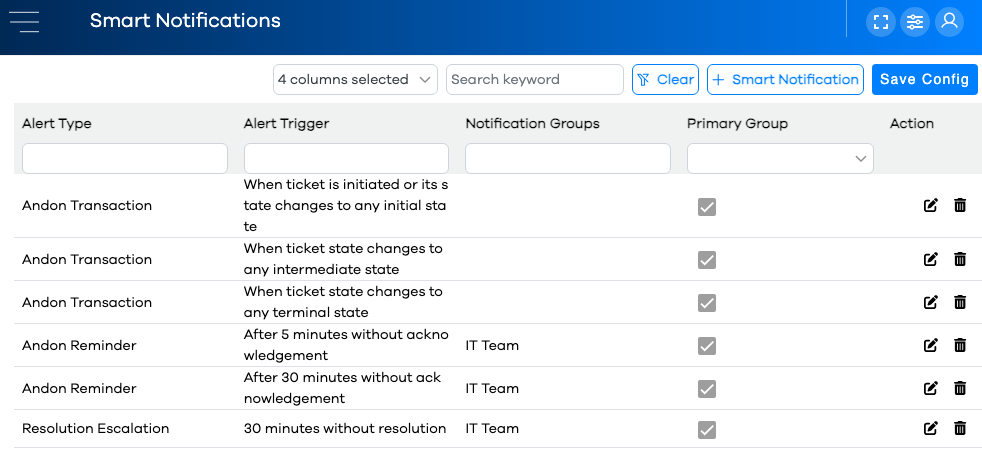
When tickets reach certain milestones in their lifecycle, notifications can be automatically sent based on certain criteria. For example, if a ticket is opened and its notification group notfied, but isn't acknowledged by the appropriate team after 15 minutes, a notification can be sent to a different notification group as an escalation.
Smart Notifications are configured using the Smart Notifications Editor.
Alert Types
There are four types of alerts for Smart Notifications and Sound Alerts:
Alert Type | Description |
|---|---|
Andon Escalation | When a ticket changes status, a timer is started. If the timer exceeds a certain duration before changing status again, this alert is sent to the specified Notification Group(s). |
Andon Reminder | After a ticket is opened in the "Request Made" status, a timer is started. If the timer exceeds a certain duration before being acknowledged, a reminder is sent to the appropriate Notification Group(s). |
Andon Transaction | PEER™ provides three different "states" for Ticket Status. System and Custom states are assigned to one of these three states. When a ticket changes to a status belonging to one of these three states, the specified Notification Group(s) will be alerted. More info on Ticket Status State Types below. |
Resolution Escalation | When a ticket is opened in the "Request Made" status, a timer is started. If the timer exceeds a certain duration before entering a Terminal status, an escalation notification is sent to the appropriate Notification Group(s). |