Editing Statuses
Ticket Statuses can be added to the three required system statuses, using this editor.
Click in the left-hand navigation bar within Configuration.
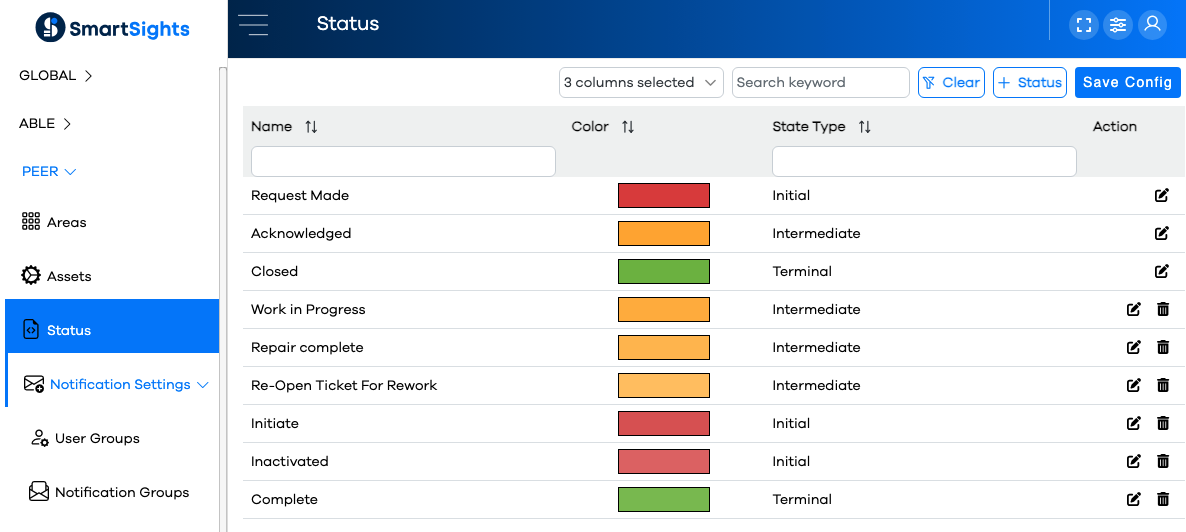
You'll be presented with a list of statuses (could be as short as three items, the top three in this example screenshot):
Note
The top three entries in this list are "System" statuses, and you can see they cannot be deleted, or edited other than changing the color assignment.
Click the button to add a new status.
Enter the name for the new status (the name can only contain alphanumeric characters, hyphen, underscore and single spaces between words).
Select a specific color to assign to the status. This is the color which will be applied to the Ticket panel in the Message Center.
Select a State Type. There are three possible values, the most typical for a custom state being "Intermediate":
Click the button.
Important
After making edits or additions in Configuration, it's important to remember to click the button so your changes will be communicated to the runtime. Runtime users will need to refresh their browsers for the changes to be reflected.