Event Details

Event Details can be launched either from the DNA View, or through the Asset Detail Data tab in the Asset Detail View. It identifies all the general information about an event. More context may be found regarding an event through the Operator View.
Event Composition
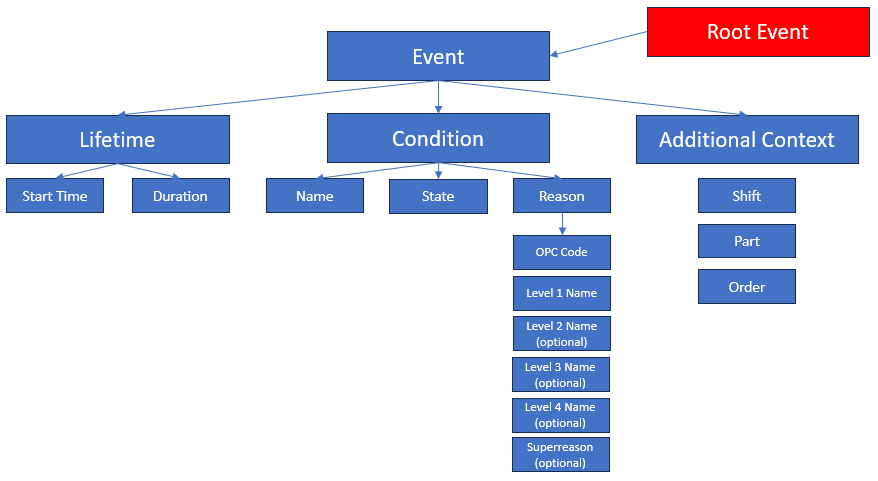
An "event" in ABLE™ is comprised of several components:
Component | Description |
|---|---|
Start Date/Time | The time at which this event started, which is always due to a transition from a previous condition or context value. |
Duration | The time elapsed between the start of this event and the transition to a new condition or context value. |
The condition of an event is determined by the evaluation of logic elements by the Logic Engine. It then determines the state and reason of an event. | |
OPC Code | This is an arbitrary code assigned by ABLE to represent the reason associated with the condition. The current OPC Code of an asset is published in the "Reason" tag in the IDC Namespace. |
The combination of up to 4 reason levels indicating why the line is in a particular state. | |
An event's reason often flows up through root cause propagation. The Root Event of an asset's event is just a cross-reference to the event from another asset which affected it. | |
In addition the above components, any of a number of context values can be associated with an event, such as the Shift within which it started, the Part the asset was running when the event occurred, etc. |