IDC Namespace
After the ABLE™ Edge Service completes each scan to determine current asset condition, it posts its feedback back to its source OPC Server, using what we call the "IDC Namespace". In Kepware, the namespace is exposed as a Channel in the connectivity tree, alongside all the PLC channels that are being monitored by ABLE™. Within it, each non-virtual asset will have a device in the IDC channel. The tags located within each channel can be monitored by an external system, just like any PLC tag.
Note
The name assigned to the device is, by default, the ABLE asset name, but can be overriden with any arbitrary string, for use when an MES Integration is implemented, in order to keep consistency between the MES asset names and the ABLE assets.
It's best to think of the IDC Namespace as a "Virtual PLC" that represents ABLE™. ABLE publishes data to tags (or OPC Items) in this virtual PLC, which Kepware passes along to any OPC clients connected to it. While most of the tags published here are read-only, there are a couple exceptions noted below, to which data can be written by an outside system, in order to inform ABLE™ of non-PLC-related activity, so it can change condition/state accordingly.
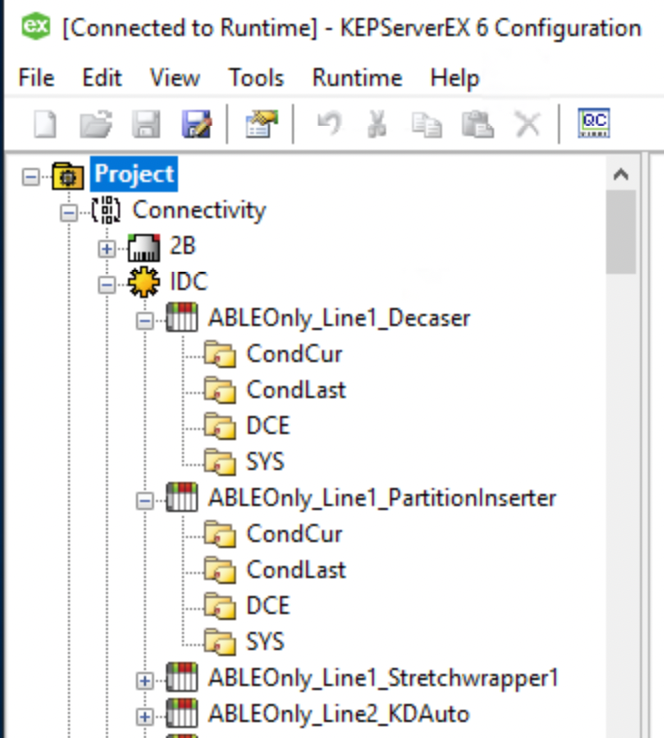
Each device/asset in the IDC Namespace consists of the exact same folder/tag structure. There are a total of 35 tags divided into 4 folders, each of which are described below:
DCE Folder
This folder is the most commonly used by external systems, as the data therein is the result of logic computed in the Edge Service.
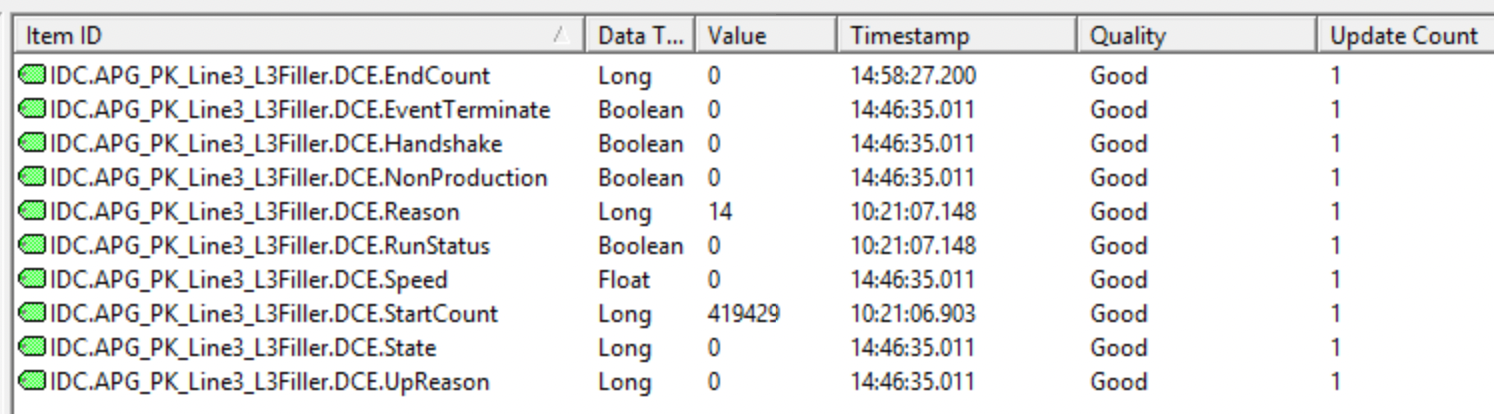
Tag Name | Datatype | Description | Example Value |
|---|---|---|---|
EndCount | Long Integer | Reflects the current value of an incrementing end counter (typically a sensor at the asset's outfeed). Counts are calculated by ABLE based on activity from one or more PLC tags. | 419429 |
EventTerminate | Boolean | This bit flips from low to high when ending a downtime condition and starting a new downtime condition, without going to a RUN condition in between. | 0 or 1 |
Handshake | Boolean | This is a bit to which a value can be written from an external source, and used within condition logic to make decisions about an asset's state or reason. For example, if the external system flips this bit from low to high, it might signal ABLE™ to change from one condition to another. | 0 or 1 |
NonProduction | Boolean | As with the Handshake tag, this is a read/write bit whose value can be used by the Edge Service to make condition decisions. | 0 or 1 |
Reason | Long Integer | When an ABLE™ downtime condition catches, its Local Reason code will be exposed in this tag. During runtime conditions, this value will be 0. | 1114 |
RunStatus | Boolean | When in a runtime condition, this bit will be high, otherwise low. | 0 or 1 |
Speed | Float | While rarely used, this value will be the result of a calculation considering an asset's StartCount value's rate of change. | 48.6 |
StartCount | Long Integer | Reflects the current value of an incrementing start counter (typically a sensor at an asset's infeed). Counts are calculated by ABLE based on activity from one or more PLC tags. | 419429 |
State | Long Integer | Every event in an asset's timeline consists of a start time, duration, state, and reason. The integer corresponding to the asset's current state will be reflected here. |
|
UpReason | Long Integer | When an asset is in runtime, but running in some non-ideal condition (say ramping up to ideal speed), this integer would represent a reason code corresponding to a reason in the asset's reason list. | 14 |
CondCur / CondLast Folders
These two folders are identical, other than CondCur representing the current condition and CondLast representing the condition immediately prior to the current one.

Tag Name | Datatype | Description | Example Value |
|---|---|---|---|
LocReasonCode | Long | The local reason code corresponding to a reason in the asset's reason list | 27 |
LocReasonListText | String | Reasons can be combinations of up to four hierarchical levels of text. The value in this tag is a "\" backslash-separated string representing the text value of each level. | Operator Stops \ Not In Auto |
LocReasonName | String | This tag actually represents the name of a condition., which typically corresponds the local reason list text. | Operator Stop - Not In Auto |
RootReasonCode | Long | When the edge service computes root cause, a secondary or virtual asset can propogate the root cause reason of the ultimately failed asset up the or down the line to the critical asset. This code typically corresponds to a reason combination containing the name of that offending asset, and sub-reasons identifying why it failed. This value will most often differ from the LocReasonCode tag, with reason information regarding the overall line, rather than a reason within the asset itself. | 2307 |
RootReasonListText | String | Like LocReasonListText (see above), a backslash-separated hierarchical representation of the up-to-four-level reason. | Capper \ Not in Auto |
RootReasonName | String | Like LocReasonName (see above), the name of the condition which corresponds to the root reason being thrown. | Operator Stop - Not in Auto |
StateCode | Long | The integer value corresponding to a conditions state |
|
StateFillColor | Long | The decimal representation of the hex color value associated with the state background in FactoryView. | 14423100 |
StateName | String | The text name of the state | Failed |
StateTextColor | Long | The decimal representation of the hex color value associated with the state font in FactoryView | 16777215 |
StateTime | Long | The number of seconds in the event. For the CondCur tag, this value will increment once per second continuously. For the CondLast tag, this value will represent the total length of that finished event. | 1299012 |
SYS Folder
The tags in this folder are used for debugging and diagnostics purposes, and will thus not be covered in this document.