Item Extensions
The logic engine can extend the behavior of selected datatypes, using item extensions. Certain extensions will only be available for specific datatypes.
DataType | Is Array | Analog Ext | Bin to Dec Ext | Boolean Ext |
|---|---|---|---|---|
Boolean | No | X | X | |
Yes | X | |||
Word / Short | No | X | X | |
Yes | X | |||
DWord / Short | No | X | X | |
Yes | X | |||
Float / Double | No | X | X | |
Yes | X |
For numeric values, not including Boolean, further qualification can be applied to the item to affect its behavior. Following are the available parameters for evaluating these values:
Parameter | Description |
|---|---|
Engineering Unit | An optional description of the unit which the numeric value describes |
Deadband | When a tag is evaluated against a Rate of Change (ROC) logic type, the logic engine will ignore changes of this value until the specified threshold is met (in engineering units). For example when set to "10", if a Long counter tag increments once for every unit coming out of the filler, the filler must produce 10 units before the ROC logic evaluates to true. |
Value Limits | |
Raw Value Scaling |
The concept of a binary to decimal extension is to find the first bit set high within an integer, a Boolean array, or an integer array. Inside the controller there are individual bits mapped to faults or other status messages. The logic engine can evaluate the position of this first high bit, and translate it into an integer value, so it can be cross-referenced to a reason, evaluated on its own, etc.
Each bit in an integer represents a power of 2. For example, if bit 5 is the first high bit found in the integer, then its actual decimal value would be 25, whose decimal value is 32. Bit 15 would be 215, or 32768. And so on.
Rather than having to evaluate these large disparate integers, we ask the question "which bit is it?" The Binary to Decimal extension translates the bit position into an integer value. So if bit 15 is the first high bit, the value returned to the logic engine would be 15, not 32768, which is much easier to consume and compare.
Parameter | Description |
|---|---|
Element Offset | When evaluating an array of integers, this is used to change the ranges returned for the various elements. This value is added to the element index (zero-based) before multiplying with the Element Multiple. |
Element Multiple | When evaluating an array of integers, a range is assigned to each element in the array. This makes it easier to understand which element of the array had the first high bit. For example, if you wanted the first element's bits to be 0-15, the second element's to be 100-115, the third's to be 200-215, etc, you would set the Element Multiple to a value of 100. |
Bit Base | This specifies what you want the first number in each range to be (typically "0" or "1"). So if you preferred a range of "1-16" instead of "0-15", you would specify a "1" Bit Base. |
All of this can be simplified into a formula, which is actually what the logic engine uses:
Returned Value = (Velement + EOffset) * EMultiple + Vbit + BitBase
Where Velement is the zero-based index of the array element (or zero if it's a single integer), and Vbit is the zero-based index of the first high bit in that element. Here are some examples to illustrate:

Item Name | N7:11 |
Datatype | Word |
Is Array | No |
Element Offset | N/A (or "0") |
Element Multiple | 100 |
Bit Base | 0 |
Returned Value = (Velement + EOffset) * EMultiple + Vbit + BitBase
(0 + 0) * 100 + 11 + 0 = 611
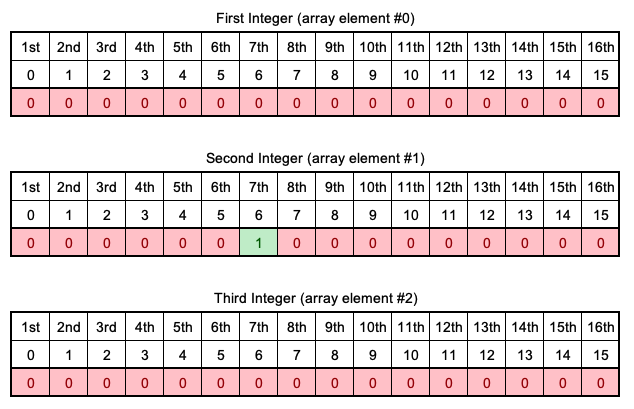
Item Name | Faults[0]{3} |
Datatype | Short |
Is Array | Yes |
Element Offset | 0 |
Element Multiple | 32 |
Bit Base | 1 |
Returned Value = (Velement + EOffset) * EMultiple + Vbit + BitBase
(1 + 0) * 32 + 7 + 1 = 40
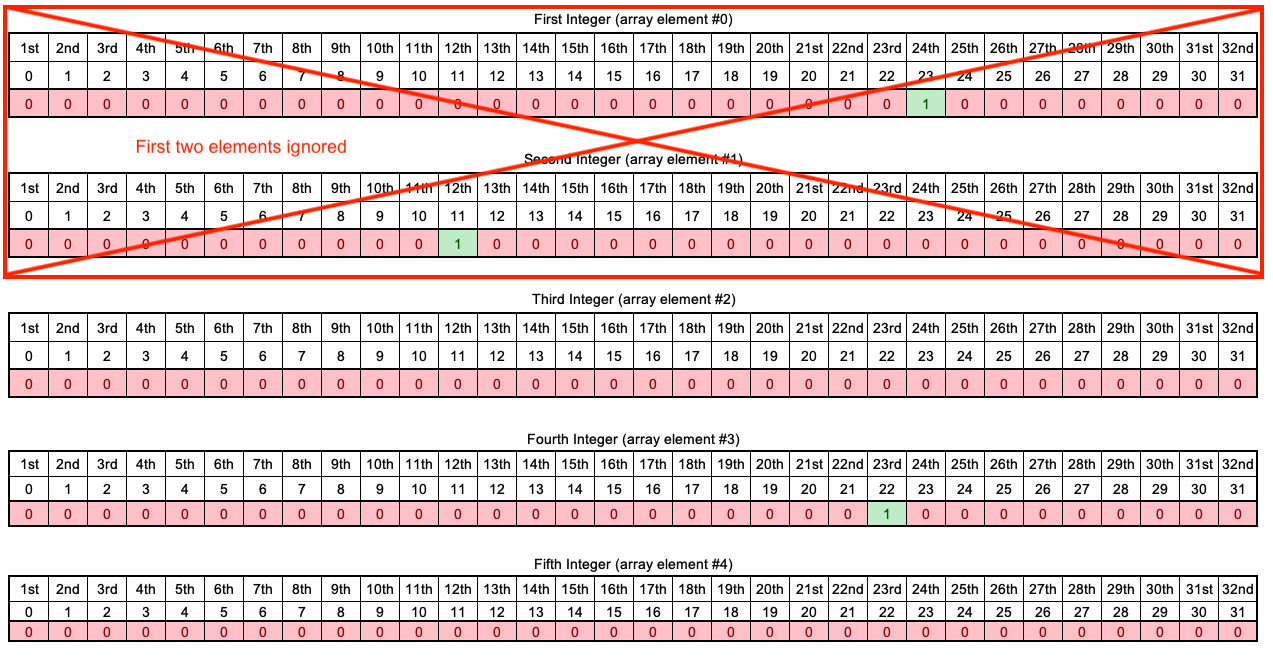
Item Name | MESSAGES[0]{5} |
Datatype | Long |
Is Array | Yes |
Element Offset | 2 |
Element Multiple | 100 |
Bit Base | 0 |
Returned Value = (Velement + EOffset) * EMultiple + Vbit + BitBase
(3 + 2) * 100 + 22 + 0 = 522